第一章 门户混合类
门户混合类用来处理跟门户用户相关的操作,例如将销售订单共享给客户或供应商。本章就来详细学习一下门户混合类的相关作用。
基础属性
整个门户混合类的代码结构还是比较简洁的。原生所有的字段只有如下三个:
access_url = fields.Char(
        'Portal Access URL', compute='_compute_access_url',
        help='Customer Portal URL')
access_token = fields.Char('Security Token', copy=False)

# to display the warning from specific model
access_warning = fields.Text("Access warning", compute="_compute_access_warning")
- access_url: 门户访问的URL
- access_token: 门户访问的access token
- access_warning: 门户访问某些模型时的警告信息
access_url
我们首先来看access_url的获取逻辑,从代码上看access_url的逻辑很简单:
def _compute_access_url(self):
    for record in self:
        record.access_url = '#'
就是简单地给access_url赋值一个'#'号。但我们在实际应用中,并不是直接使用这个字段,而是使用get_portal_url方法来获取公开访问链接。
用户在获取到这个链接后,可以在一段时间内公开访问这个URL。
门户公开URL获取
我们上面提到了get_portal_url方法,那么现在我们就来看一下这个方法的使用说明。
def get_portal_url(self, suffix=None, report_type=None, download=None, query_string=None, anchor=None):
    """
        Get a portal url for this model, including access_token.
        The associated route must handle the flags for them to have any effect.
        - suffix: string to append to the url, before the query string
        - report_type: report_type query string, often one of: html, pdf, text
        - download: set the download query string to true
        - query_string: additional query string
        - anchor: string to append after the anchor #
    """
    self.ensure_one()
    url = self.access_url + '%s?access_token=%s%s%s%s%s' % (
        suffix if suffix else '',
        self._portal_ensure_token(),
        '&report_type=%s' % report_type if report_type else '',
        '&download=true' if download else '',
        query_string if query_string else '',
        '#%s' % anchor if anchor else ''
    )
    return url
get_portal_url方法接受以下几个参数:
- suffix: URL的后缀
- report_type:报表类型通常是如下三个之一:html pdf text
- download: 是否下载
- anchor:锚点后的字符
AccessToken生成机制
从上面的代码中,我们可以看到获取access token使用的是_portal_ensure_token方法。那么现在我们就来看看_portal_ensure_token是如何生成accesss token的:
def _portal_ensure_token(self):
    """ Get the current record access token """
    if not self.access_token:
        # we use a `write` to force the cache clearing otherwise `return self.access_token` will return False
        self.sudo().write({'access_token': str(uuid.uuid4())})
    return self.access_token
代码很简单,token的生成就是一个简单的uuid4的实例。
共享向导
我们在这使用共享功能时,通常是通过类似下面图片的一个弹窗向导来完成的:
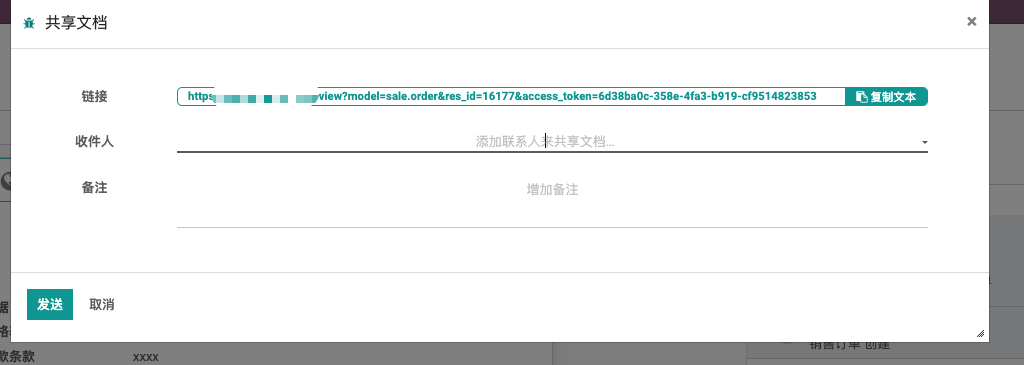
那么这个弹窗的内部实现逻辑是怎样的呢?
首先,这个弹窗使用的是共享模型向导(portal.share),关于这个模型的具体内容,我们在后面介绍。这里只需要明确,共享模型向导使用的是门户模型的私有方法_get_share_url来获取的共享链接。
那么,_get_share_url方法又是如何获取共享链接的呢?我们先来看它的具体实现代码:
def _get_share_url(self, redirect=False, signup_partner=False, pid=None, share_token=True):
    """
    Build the url of the record  that will be sent by mail and adds additional parameters such as
    access_token to bypass the recipient's rights,
    signup_partner to allows the user to create easily an account,
    hash token to allow the user to be authenticated in the chatter of the record portal view, if applicable
    :param redirect : Send the redirect url instead of the direct portal share url
    :param signup_partner: allows the user to create an account with pre-filled fields.
    :param pid: = partner_id - when given, a hash is generated to allow the user to be authenticated
        in the portal chatter, if any in the target page,
        if the user is redirected to the portal instead of the backend.
    :return: the url of the record with access parameters, if any.
    """
    self.ensure_one()
    if redirect:
        # model / res_id used by mail/view to check access on record
        params = {
            'model': self._name,
            'res_id': self.id,
        }
    else:
        params = {}
    if share_token and hasattr(self, 'access_token'):
        params['access_token'] = self._portal_ensure_token()
    if pid:
        params['pid'] = pid
        params['hash'] = self._sign_token(pid)
    if signup_partner and hasattr(self, 'partner_id') and self.partner_id:
        params.update(self.partner_id.signup_get_auth_param()[self.partner_id.id])

    return '%s?%s' % ('/mail/view' if redirect else self.access_url, url_encode(params))
这个方法接受3个参数:
- redirect:使用跳转链接而不是直接共享的链接
- signup_partner:允许用户使用预置的字段创建账号
- pid: 客户id,如果设置,将会生成一个用户授权的hash字符,用来在门户留言中使用。
此方法返回一个URL链接。
共享URL的权限机制
时常有客户会反应,有时候共享的URL不需要登陆就可以打开,有时候则需要登陆,不知道其中的规律是什么,为了搞清楚这个问题,我们深入查看了共享URL的权限验证机制:
def _redirect_to_record(cls, model, res_id, access_token=None, **kwargs):
    """ If the current user doesn't have access to the document, but provided
        a valid access token, redirect him to the front-end view.
        If the partner_id and hash parameters are given, add those parameters to the redirect url
        to authentify the recipient in the chatter, if any.
    """
其注释是这么写的,如果当前用户没有访问文档的权限但提供了有效的Access Token,则将其引导至前端页面。
然后我们来看它的内部逻辑:
if isinstance(request.env[model], request.env.registry['portal.mixin']):
    uid = request.session.uid or request.env.ref('base.public_user').id
    record_sudo = request.env[model].sudo().browse(res_id).exists()
    try:
        record_sudo.with_user(uid).check_access_rights('read')
        record_sudo.with_user(uid).check_access_rule('read')
    except AccessError:
        if record_sudo.access_token and access_token and consteq(record_sudo.access_token, access_token):
            record_action = record_sudo.with_context(force_website=True).get_access_action()
            if record_action['type'] == 'ir.actions.act_url':
                pid = kwargs.get('pid')
                hash = kwargs.get('hash')
                url = record_action['url']
                if pid and hash:
                    url = urls.url_parse(url)
                    url_params = url.decode_query()
                    url_params.update([("pid", pid), ("hash", hash)])
                    url = url.replace(query=urls.url_encode(url_params)).to_url()
                return request.redirect(url)
return super(MailController, cls)._redirect_to_record(model, res_id, access_token=access_token, **kwargs)
这段代码就比较有意思了,uid是当前用户,record_sudo是当前要访问的文档。首先系统会校验当前用户是否对当前文档是否具有访问权限(包括文档权限校验和用户规则校验),如果权限校验通过,那么系统会将用户导向后台页面。
因此,如果当前用户并没有登陆,则会跳转到登陆页面要求用户进行登陆。而如果用户没有访问文档的权限,则会开始校验用户的Access Token,如果用户提供的Access Token有效,则跳转到前端页面。 如果无效,则会同样跳转到登陆页面。
多Token管理
odoo原生对于每个单据只生成了一个Token,且没有限制访问时间。为了更加精确地控制和针对不同客户分配不同的Token的需求,我们在门户解决方案中增加了Token管理的功能。
用户每次点击分享按钮都会生成一个新的Token,并且可以在单据中对此单据关联的Token进行管理。
详细请参考《实施手册》门户一章。